Deeprank AI / Guides · Updated November 11, 2026
ChatGPT domain verification: how to add the openai-business-profile TXT record
When you claim or create a business in ChatGPT, one way to prove ownership is a DNS TXT record. The instruction on screen trips up most DNS panels. This guide from Deeprank AI shows the exact entry that works, from a real verification on November 11, 2026.
Short answer
In your DNS provider, add a TXT record. For the host or name, enter only openai-business-profile, not the full openai-business-profile.yourdomain.com that ChatGPT shows. For the value, paste the whole string starting with openai-business-profile=. Save, wait a few minutes, then select Verify domain in Business Hub.
What ChatGPT asks you to add
On the “Verify that you control yourdomain.com” screen, ChatGPT’s Business Hub shows one DNS record in three parts, each with a copy button, and an expiry time underneath.
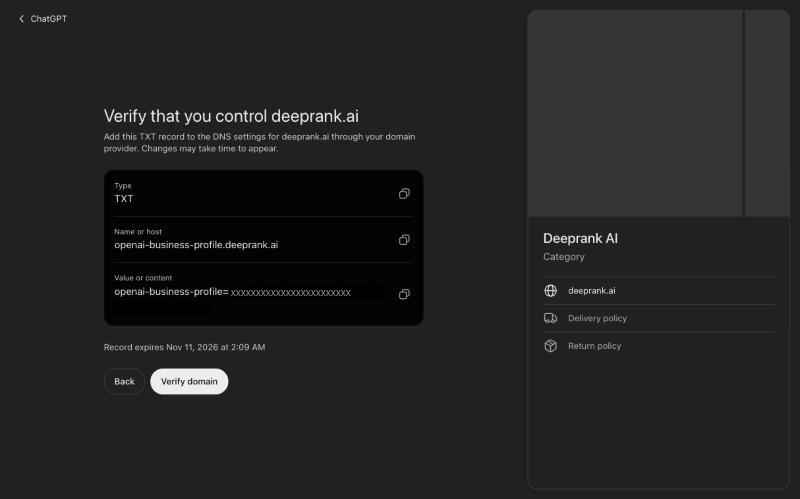
| Field | What ChatGPT shows | What to enter at your DNS provider |
|---|---|---|
| Type | TXT | TXT |
| Name or host | openai-business-profile.yourdomain.com | openai-business-profile only |
| Value or content | openai-business-profile= + your code | The whole string, unchanged |
| TTL | Not specified | Leave your provider’s default |
Why ChatGPT domain verification fails
ChatGPT displays the record’s full name, including your domain. Most DNS panels expect only the part before your domain and add the domain themselves. Copy the full name with the copy button, paste it in, and the provider quietly creates the wrong record:
| You enter as host | Record your provider creates | Result |
|---|---|---|
openai-business-profile.yourdomain.com | openai-business-profile.yourdomain.com.yourdomain.com | Verification fails |
openai-business-profile | openai-business-profile.yourdomain.com | Verification passes |
This happened to us. Verifying an online shop’s domain hosted on Amazon Route 53, the pasted host gained a second copy of the domain and Verify domain failed. Entering only openai-business-profile fixed it on the next attempt.
Rule of thumb: if your DNS panel shows your domain greyed out next to the host box, or says “leave blank for root”, it adds the domain for you. Enter only openai-business-profile.
Add the record, step by step
- Find out where your DNS is hosted. It is often your domain registrar, but it can be a separate service such as Cloudflare or Amazon Route 53. The record has to go where your nameservers point.
- Open the DNS records for the domain you entered in Business Hub.
- Add a new record and choose type TXT.
- In the host or name field, type
openai-business-profile. - In the value field, paste the full value from Business Hub. It starts with
openai-business-profile=. Don’t add spaces. Most panels add quotation marks themselves. - Leave TTL on its default and save.
- Wait a few minutes, check the record, then go back to ChatGPT and select Verify domain.
If someone else manages your domain, send them the type, the short host and the value. Tell them about the host: it is the part people get wrong.
Check that the record is live
Before selecting Verify domain, confirm the record resolves at the name ChatGPT expects. Replace yourdomain.com with your domain.
Mac or Linux: dig +short TXT openai-business-profile.yourdomain.com
Windows: nslookup -type=TXT openai-business-profile.yourdomain.com
- You see the value starting with
openai-business-profile=: the record is live. Verify in Business Hub. - You see nothing: either it hasn’t spread yet, or the host is doubled. Run the same command with your domain added twice,
openai-business-profile.yourdomain.com.yourdomain.com. If the value appears there, delete that record and add it again with the short host.
Still failing? Other causes
- The record expired. Business Hub shows “Record expires” with a date and time under the record. After that, the code on screen is no longer valid and you need a current record from Business Hub.
- The value is incomplete. The prefix
openai-business-profile=is part of the value. Pasting only the code after the equals sign won’t match. - The record is at the wrong provider. If your nameservers point to Cloudflare but you added the record at your registrar, nothing sees it.
- The record is on the wrong domain. It belongs on the domain you typed into Business Hub, without www.
- It needs more time. DNS changes can take a while to appear. Check with the command above rather than retrying blindly.
Domain verification is one of four methods. If it won’t work for you, Business Hub may also offer business phone, business email or Shopify: see the four ways to verify a ChatGPT business profile.
What happens after domain verification
A verified domain proves you control the website. It is not the end of setup. For a new profile, Business Hub continues with your business category, a description of up to 300 characters and contact details. OpenAI then reviews the claim, and you complete identity verification with Persona before you can publish changes or see insights. The full sequence is in how to claim or create a ChatGPT business profile.
And a verified profile still doesn’t decide whether ChatGPT names your business when a customer asks who to choose. That part is covered in how to get recommended by ChatGPT.
Questions, answered
What do I enter as the host for the ChatGPT TXT record?+
Enter only openai-business-profile. ChatGPT displays the full name, openai-business-profile.yourdomain.com, but most DNS providers add your domain to the host automatically. Pasting the full name creates openai-business-profile.yourdomain.com.yourdomain.com, and verification fails.
Why does ChatGPT domain verification keep failing?+
The most common cause is a doubled domain in the record name, from pasting the full host into a DNS panel that appends the domain itself. Other causes are an incomplete value (it must start with openai-business-profile=), DNS changes that haven’t spread yet, and a record that has passed the expiry time shown in Business Hub.
What is the openai-business-profile TXT record?+
It is a DNS text record that proves you control a domain when you claim or create a business profile in ChatGPT’s Business Hub. Its name is openai-business-profile on your domain, and its value is openai-business-profile= followed by a code unique to your claim.
How long does the ChatGPT TXT record take to work?+
It depends on your DNS provider: often minutes, sometimes longer. Business Hub shows an expiry time under the record, so add it and select Verify domain before then.
Will the TXT record affect my website or email?+
No. A TXT record on the openai-business-profile name is separate from the records that direct your website and email. Adding it changes nothing about where they point.
How do I check that the ChatGPT TXT record is live?+
Run dig +short TXT openai-business-profile.yourdomain.com on Mac or Linux, or nslookup -type=TXT openai-business-profile.yourdomain.com on Windows. If the value starting with openai-business-profile= comes back, the record is live and you can select Verify domain.
Sources
- OpenAI Help Center — Setting up your business on ChatGPT
- OpenAI — Introducing Businesses in ChatGPT (November 10, 2026)
OpenAI pages checked November 11, 2026. Businesses in ChatGPT is in beta and OpenAI may change the steps and eligibility. Written by Deeprank AI, which helps businesses get found and recommended by ChatGPT, Gemini, and other AI tools.